
Discover the Magic of Smart Lighting with Govee Table Lamp 2 Pro

Updated: Sep 28, 2025
Smart lighting is one of those things you don’t realize you need until you try it. The Govee Aura Smart Table Lamp and the newer Govee Table Lamp 2 are compact, stylish, and loaded with features like music sync, voice control, and Matter smart home support. If you’ve ever wanted to turn a plain corner into a glowing mood booster, this guide is for you.
Exciting Features of the Govee Table Lamp 2 Pro
Govee Table Lamp 2 Pro x JBL — This model comes with a built-in JBL speaker, approximately 210 RGB LEDs, a powerful 5,200 mAh battery, and full Matter support. Check it out here.
Matter Integration — It works seamlessly with Google Home, Alexa, Apple Home, and SmartThings.
Better Colors & Presets — Enjoy richer colors, smoother dimming, and fun scenes like Aurora and Romantic Glow.
Improved App Stability — Recent updates have fixed lag, group control glitches, and widget issues.
Bottom line: The newer Aura and Table Lamp 2 models are brighter, smoother, and easier to integrate into your smart home setup.
Step-by-Step Setup Guide
1) Unbox & Place Your Lamp
Pick a spot near an outlet (or go wireless if you bought the Pro model). Desks, bedside tables, and living room corners are perfect.
2) Power It On
Plug it in or charge it up, then use the touch controls for quick brightness and color adjustments.
3) Download the Govee Home App
Get it on iOS or Android. Make sure your phone is connected to 2.4 GHz Wi-Fi.
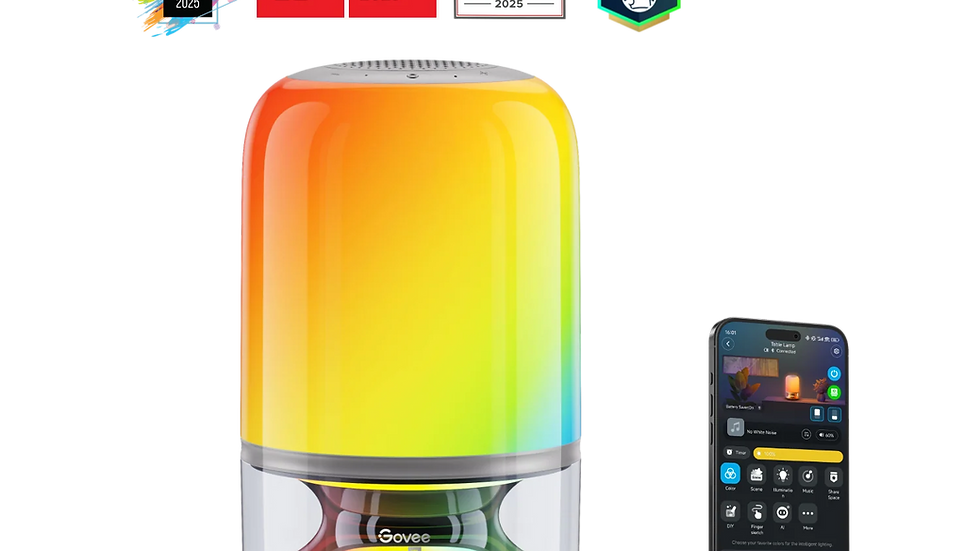
4) Connect & Update
Pair your lamp via Bluetooth or Wi-Fi. Don’t forget to install firmware updates for new effects and smoother dimming.
5) Customize Your Lighting
Explore preset scenes like Sunrise, Aurora, and Candlelight.
Try DIY mode to design your own effects.
Use music sync mode for sound-reactive vibes.
6) Add Voice Control
Examples:
“Alexa, set my Aura lamp to sunset mode.”
“Hey Google, dim the Table Lamp 2 to 20%.”
7) Automate It
Set schedules for wake-up lighting, movie nights, and bedtime fade-outs.
Pro Tips for Maximum Glow
Low-level dimming is perfect as a night-light.
Rename your favorite scenes (e.g., Romantic Glow) for easy voice commands.
If you have the Pro version, move it around—bedroom, porch, dinner table—portable lights are a blast!
Watch-Outs
The Pro version is pricier (you’re paying for JBL + battery + LEDs).
Some models still use AC adapters instead of USB-C.
The lowest dimming level isn’t pitch black—there can be a faint glow.

Final Verdict
The Govee Aura Smart Table Lamp and Table Lamp 2 hit a sweet spot of fun, style, and practicality. With Matter support, music sync smart lights, and endless customization, they’re among the best smart table lamps of 2025. If you want sound + portability, the Pro x JBL is worth it; otherwise, the regular Table Lamp 2 is a great value.
Final Thoughts
Smart lighting isn’t just tech—it’s how your space feels. With the Govee Aura and Table Lamp 2, you can go from everyday ordinary to Instagram-worthy in seconds.
Why Smart Lighting Matters
Smart lighting enhances your home’s ambiance. It can transform your mood and even help with productivity. Imagine working late at night with a soft, warm glow. Or hosting friends with vibrant colors that dance to the music. Smart lighting gives you control over your environment, making every moment special.
The Future of Smart Lighting
As technology evolves, so does smart lighting. Expect even more integration with your favorite devices. Picture this: your lights dim automatically when it's movie time or brighten as you wake up. The possibilities are endless, and the Govee Table Lamp 2 Pro is at the forefront of this revolution.
Ready to let your lamp set the mood? 🌈 If the product links above ever stop working, you can always browse the full Govee Lamp Collection to find the latest Aura and Table Lamp models.


Comments